



Key Points
The engineering team's been busy again. Here's what's landed in Intruder this month.
TL;DR
- Intruder MCP server in Claude Desktop: connect Claude to Intruder in a few clicks, no code needed, then ask it about your attack surface, AI pentests, and more
- GregAI product expert: ask GregAI how to set up or use Intruder and get answers from our help docs
- AWS organizations on Cloud and Pro: connect a whole AWS organization and choose which accounts to scan
- Streamlined settings: a new Profile section for your personal preferences, plus quicker access to the Help Centre and System Status
Set up Intruder MCP in Claude, no code needed
Connecting Claude Desktop to Intruder through our MCP server now takes just a few clicks. Once connected, you can ask Claude about your security posture and get clear, easy-to-follow answers, pulled straight from your Intruder account. Beyond answering questions, Claude can add a target, run a scan, or put together a summary for leadership.
New this month:
- Check your attack surface: "where are we exposing SSH?" or "which certificates expire this month?"
- Work with your AI pentests: review pentests, findings, and runs, start a retest or release test, or cancel a running test
Available on: Cloud, Pro, and Enterprise
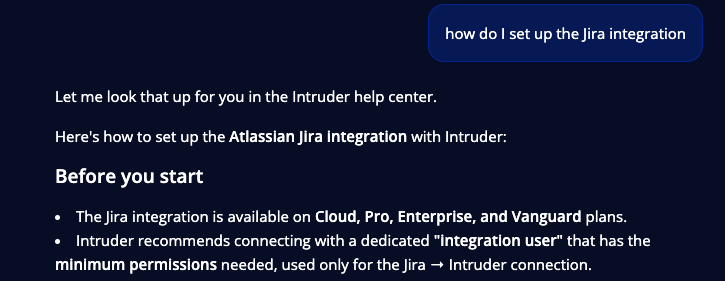
GregAI, your Intruder product expert
Need a hand setting up an integration, or troubleshooting a scan? GregAI now draws on our Help Centre documentation and best practices. That means you've got a product expert on hand to help you set things up properly and get more out of Intruder, right here on the platform.
Available on: Cloud, Pro, and Enterprise
Your whole AWS organization, connected in one go
Got more than one AWS account? You can now connect your whole AWS organization to Intruder in one step. Every account shows up together, so you get the full picture of your AWS estate straight away and can decide which accounts you’d like to be scanned.
Available on: Cloud, Pro, and Enterprise
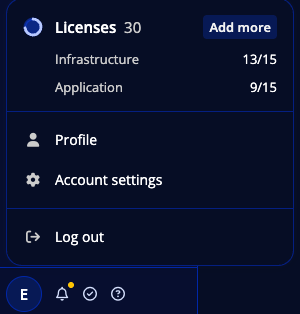
Find your settings faster with the new Profile page
Your personal settings now have their own Profile section, separate from account-wide Settings, so it's clear at a glance what only affects you.
- Appearance: switch between light and dark mode right from your Profile page
- Help Centre and System Status: both are one click away at the bottom of the side navigation
- Users page: spot yourself straight away, with your own row labelled "You"
- Old links: My Account links and bookmarks take you straight to Profile, so nothing breaks
ICYMI
Last month, we brought AI pentest reports into Vanta as compliance evidence. We also added a new Manager role, so teams can look after their own assets. Catch up on October's roundup.
Try it for yourself
All of it's live now. Log in to take a look, or if you're new here, start a free trial and see what's exposed across your attack surface.
Interested in AI pentesting? Learn more about pentest pricing, or book a call.
Got feedback or something you'd like to see next? Send it our way.

Vulnerabulletin